FFXIV Hunt Train Guide
Final Fantasy XIV: The Hunt
How to Run
Hunt Trains
Introduction
If you're here, that means you know how Hunts work and you're ready to dive into running Hunt Trains. If you stumbled upon this page and don't know what The Hunt in FFXIV is, please visit The Modern Guide to FFXIV Hunts. If you want basics on macros, you can learn more in the Hunt Relay Macros Guide.
✦ About This Guide
This guide is based off of my experiences on the Aether data center. Your data center may have different practices and customs, but I've tried my best to include what I've witnessed in the North American region.This guide provides resources for getting started with scouting and conducting without the use of 3rd-party tools. It does not cover how to reach out to your community and coordinate with other conductors or how to use 3rd-party tools that help with train conducting. Scouting and conducting trains is possible on PC, console, with keyboard and mouse, and with controller!
Timers
✦ A-Rank Windows
All A-Ranks spawn automatically. There is no hidden condition to cause them to spawn.However, they have a cooldown period after they are defeated or after servers are restarted due to maintenance. From there, a hidden timer is set that determines when the A-Rank will spawn. The hidden timer is randomly set; it can be anywhere from right when the window opens to when the window caps. After the window is over, the A-Rank is considered capped, or "forced", and is guaranteed to spawn. There is also a possibility that the A-Rank was killed during the window without anyone knowing/recording, in which case it would be considered "sniped."

Normal Respawn Timer
HW and onwards A-Ranks respawn at a random point between 4 to 6 hours after being defeated.
Post-Maintenance Spawn Timer
HW and onwards A-Ranks spawn at a random point between 2 hours and 24 minutes and 3 hours and 36 minutes after the servers come back online.
Please note that there is no actual way to get a precise time of when servers come back online, as this can happen before the game is accessible.
Despawn Timer
A-Ranks will despawn 24 hours after it spawned. Afterwards, the normal respawn timer will begin.
What is "Force"?
A mark is "forced" if its respawn timer has capped.
What is "ToD"?
"ToD" stands for "Time of Death." It is the time in which the mark has been recorded as being defeated.
✦ Tracking Windows on Faloop
Faloop A-Rank windows are manually marked by users. They may not always be updated. Permissions may be needed to view and mark timers. How permissions are handled vary from server to server. You may hover over the text timers to view the time in your local time zone.
Open Window

This mark's spawn window has been open for 47 minutes. It is at 39% through the window.
Capped/Forced Window

This mark's spawn window has been open for 2 hours and 51 minutes. It capped 51 minutes ago.
Closed Window

This mark's spawn window is closed, and will open in 3 hours and 17 minutes.
✦ Tracking Windows on Bear Tracker
No permissions are required to view Bear Tracker. This tracker is marked automatically by a 3rd-party plugin, so if you do not see Faloop marked, Bear Tracker might have picked up ToDs.
How to Read Timers on Bear Tracker
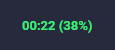
Open
This mark's spawn window has been open for 22 minutes. It is at 38% through the spawn window.
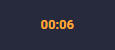
Almost Open
This mark's spawn window will be open in 6 minutes.
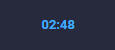
Capped / Forced
This mark's spawn window has been open for 2 hours and 48 minutes. It capped 48 minutes ago.
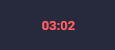
Closed
This mark's spawn window will open in 3 hours and 2 minutes.
Scouting
Scouting is searching for each A-Rank hunt mark location and recording them so that they are readily available for the conductor to call during the hunt train.Locations are marked by in-game flags, or shared using browser-based external tools.
✦ How Do I Scout?
First, you will check each spawn location to search where the A-Ranks have spawned.You may reference spawn locations on Faloop in the A-Rank Tab.Next, once you have found a mark, you will generate an in-game flag via typing commands in the chat box. This can be done by either typing <pos> while hovering over the A-Rank, or by typing <flag> after placing a flag on your map.
How to place a flag manually on your map
Detailed instructions with images can be found on the Official UI Guide.Mouse and Keyboard: CTRL + Right Click while your cursor hovers over the spot on your map.Controller: L1 + R1 while your cursor hovers over that spot on your map.
✦ How Do I Pass Scouts to the Conductor?
If you are not the one conducting the train, you will pass on the A-Rank locations via one or both of the following:
Giving them the flags in-game through a shared chat
Using a scouting tool and sharing the unique link via Discord, in-game chat, or other communication platforms.
Scouting Tools
The following links are for scouting tool websites. While they do not create flags in-game, they are helpful for passing on scouts to other people. After marking A-Rank locations, they can all generate a unique URL which leads to a page containing maps with each A-Rank location marked.
✦ When Can I Start Scouting?
You may start scouting at any point after the A-Ranks come off of cooldown. They will not all be guaranteed to be spawned until they are capped, however, you may still search early if you wish.
✦ Scouting Macros
General Scouting Macro
You may customize this macro as you desire by changing which chats it gets sent to.<t> displays what you are currently targeting, so when you scout, you will have to target the A-Rank in order to display its name. This is not necessarily required.<pos> displays your current location, so you will have to be flying within close proximity to the A-Rank to get an accurate flag coordinate.
/micon "jump" general
/echo <t><pos>
/p <t><pos>
/l1 Scouting for train: <t><pos>
Sending text in different chats
/p Party Chat: Useful for if you are scouting with other people./l1 Linkshell 1 (The number corresponds to the linkshell order in your linkshell window): If you have a linkshell for train coordination.cwl1 Crossworld Linkshell 1 (The number corresponds to the crossworld linkshell order in your crossworld linkshell window): If you have a crossworld linkshell for train coordination./echo Echo (The chat that only you can see): Useful for if you are conducting the train that you are scouting so that you can store the flags in its own chat channel.
Conducting
✦ Setting Up: Storing Flags
You may store flags of A-Rank locations and easily access them by using an Echo tab.
⚠︎ WARNING!
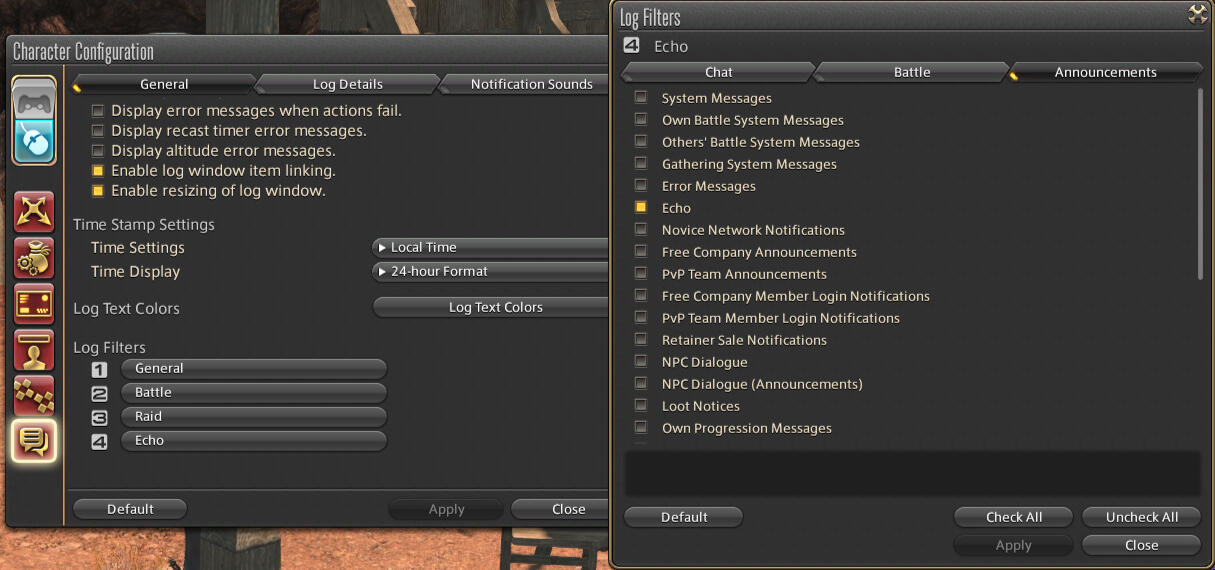
It is strongly advised to clean up your "Battle" tab, because the chat log as a whole has a limit of messages it can reach until it starts removing old ones. If you do not clear your Battle-related logs, you may lose your stored flags.To clean up your "Battle" tab, use the Log Filters window as shown below.
Creating an Echo Tab
To create an Echo tab, rename or add one of your chat log tabs and go to Character Configuration > Log Window Settings > General and under Log Filters, select the tab that you made.From there, deselect everything except "Echo" under Announcements. Save your settings by hitting Apply.
Keeping an Echo Tab Open
To keep your general chat open while having your Echo tab visible at the same time, you may drag out your Echo tab.
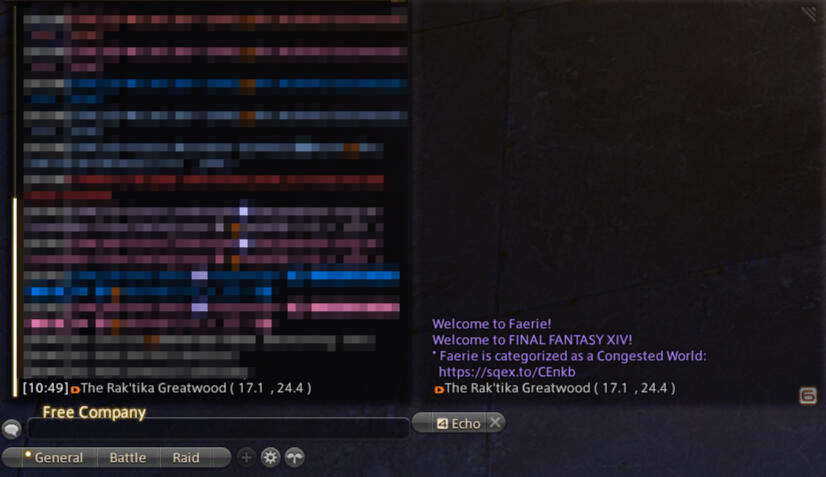
You now have easy access to the flags you'll shout to direct the train.
✦ Setting Up: Macros
Macros are optional, but they save you time compared to manually typing in shout chat.If you are shouting multiple messages within a macro, you will have to either:
Include
/wait 2in-between lines (on a new line).Include
<wait.2>after each line (within that line).
Below are example macros that you can copy/paste and edit to your liking. Before you execute these macros, make sure that you have the flag you want selected.
Next Stop
/micon "target forward" general
/sh Hunt Train NEXT STOP -> <flag>
/yell Hunt Train NEXT STOP -> <flag>
/p Hunt Train NEXT STOP -> <flag>
Teleport (Optional)
/micon "teleport" general
/sh Teleport -> <flag>
/yell Teleport -> <flag>
/p Teleport -> <flag>
Entered Zone
/sh Hunt Train has entered the zone and is headed to <flag>!
Instance
/sh INSTANCE 1
/yell INSTANCE 1
/p INSTANCE 1
Last Stop
/micon "target forward" general
/sh Hunt Train LAST STOP -> <flag>
/yell Hunt Train LAST STOP -> <flag>
/p Hunt Train LAST STOP -> <flag>
✦ Conducting Tips
Conducting Hunt Trains involves adapting to changing circumstances, such as how many passengers are on the train, whether an S-Rank spawns on the same world during the train, the demand for hunt currencies during the patch cycle, and even more!
Speed
The speed of a hunt train depends on the conductor's personal preference, or adapting to how fast the marks are dying due to high attendance.
Bullet (or Fast) Trains
Bullet trains are going to mark to mark without pause.First mark -> next mark -> next mark -> and so on...These are typically fast trains. They are recommended if marks are dying slowly.
Non-Bullet Trains
Sometimes, the conductor will want to direct people to an Aetheryte upon changing zones to wait for everyone to load in.First mark in zone -> second mark in zone -> Aetheryte in next zone -> next mark -> next mark...This method is often used during times of high attendance and congestion, to give most people a fair shot at getting credit.Meeting at an Aetheryte has different names depending on which Data Center you are on: Vibes, Rally Points, Pit Stops
When it comes to pit stop trains, one method used to determine how long to wait for everyone to load in at an Aetheryte in a zone is to teleport from the previous zone last. You would shout the flag for the next teleport location, wait for everyone that you can see to teleport away, then teleport in yourself. Keep in mind that people have different load times. Just because you have teleported in last, does not mean that everyone has arrived to the zone.Another method is to wait at the Aetheryte and watch people load in and wait until you don't see anyone else load in for a while.You can do a combination of either method above.
Periods of High Attendance
Trains often get high attendance during major patch drops for the following reasons:
New savage tier and players wish to earn new tome gear as soon as possible
New relic weapons require tomes
Tome augment items are available to purchase through Sacks of Nuts
Derailing for S-Ranks
Sometimes, an S-Rank will spawn on the same world during the train. Some train riders would like to get the rewards for the S-Rank as well. As a conductor, be sure to set expectations on whether or not you will derail to the S-Rank.Many conductors will derail an EW or SHB train for EW or SHB S-Ranks, and ignore all other S-Ranks. However, it's entirely up to you where to direct the train.
How to Derail
Once you have received notification of the S-Rank, share the flag of the S-Rank in shout chat if you are not currently attacking a mark. You may remind train riders that they should wait before attacking if there is a pull time set.After the S-Rank has died, wait a second to see if minions have spawned for the SS-Rank event. Once you are sure everything is done, direct the train to the next mark or Aetheryte.
Dealing with Disconnects
If you disconnect from the game, or your game crashes, be sure to let someone know that you've crashed and are working to get back on.Unfortunately, your chat does not remain after your game closes, so you may need to retrieve flags from someone else, or use maps from one of the scouting tools to manually generate flags in-game. If you are referencing maps from a scouting tool, you will have to eyeball where the A-Rank location is.It's always a good idea to keep a back-up of scouts in case this happens.
Instances
Sometimes, zone instances will be implemented to alleviate congestion. This means that the trains will have extra marks! It also means that you will have to specify which instance you are going to.When you change instances at the Aetheryte, you can see how many people are in each instance.
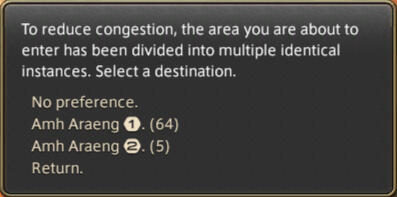
Watching this window can help you know how much of the train has made it into the correct instance.
✦ Recording Force
In order to keep track of when the A-Ranks will spawn again, conductors will record when the marks died during the train.How your specific world keeps track of train force times may vary.
Posting a Time Stamp on Discord
If there is a Discord server and channel where train coordination is done, you may take the time of death of the last mark of the train, add 6 hours, and post the time there. You can use this Date/Time Formatting Tool to display the timestamp across multiple users' time zones.
Reporting Times on Faloop
If you have a Faloop account with permissions, you may go to the A-Rank tab, click on an A-Rank, and push the "Died now" button. You may also use the up and down arrows to select a time that is not now. At the current moment, you can only do this one A-Rank at a time.
Reporting Times on Bear Tracker
You actually do not need to manually report on Bear Tracker if someone on your train is running 3rd-party apps with relays enabled. However, it's good to note that these might get automatically marked.
Relaying Your Train
Once you're ready to run the train, you will want to get the word out so people can come share the rewards (and make killing the marks go faster). Here are ways to broadcast the Hunt Train.
✦ Hunt Relay Linkshells
If you're already running trains, you're probably in a few linkshells to receive relays for hunts. You can spread word that the Hunt Train is starting by using macros to very quickly relay into those linkshells.The Hunt Relay Macro Guide has macros ready for you to copy and paste into your game.
✦ Discord
Hunt-focused Discord servers have notifications set up for users to be notified for Hunt Trains. Conductors post announcements in a specific channel with a specific role to ping users with said role.The Faloop Community page lists links to Discord servers for each Data Center.
✦ Shout Chat in Cities
Since not everyone is in a linkshell or wants to join Discord servers, shouting your Hunt Train start location in chat broadcasts to players in-game. You can shout in cities where people are lingering, especially the cities from the latest expansions and the three starting cities in ARR.
✦ Party Finder
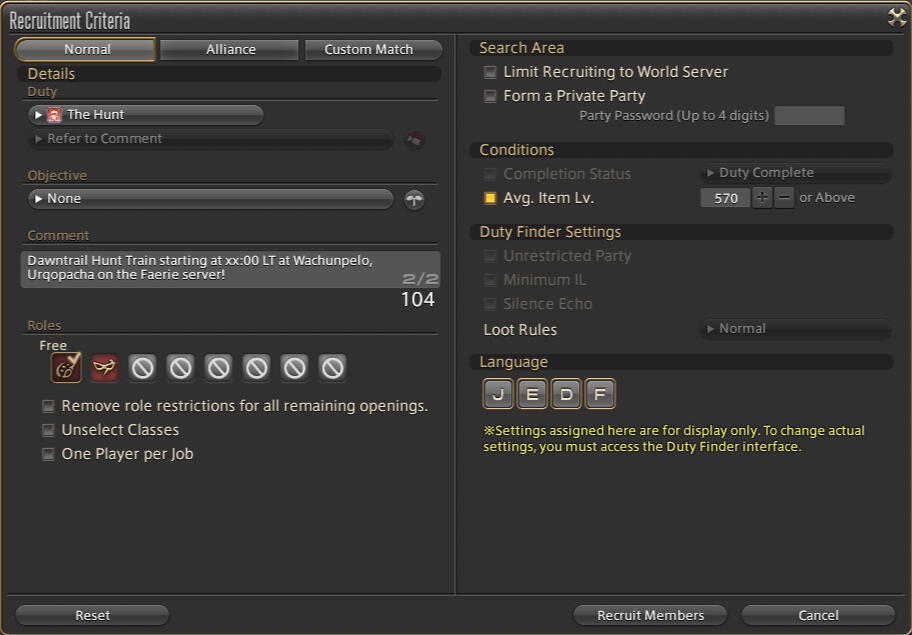
Some players casually browse Party Finder and will notice if any Hunt Party Finders are up. If you make one of the party roles a Blue Mage and set the Avg. Item Lv. to one that Blue Mage cannot achieve (currently 531+), then the party will remain active until it times out (1 hour).Since Hunt Party Finders can now be set to crossworld, you can uncheck "Limit Recruiting to World Server" to have your Party Finder show up on other worlds in your Data Center. You will have to remember to convert your party to local when you start the train if you personally want full credit.